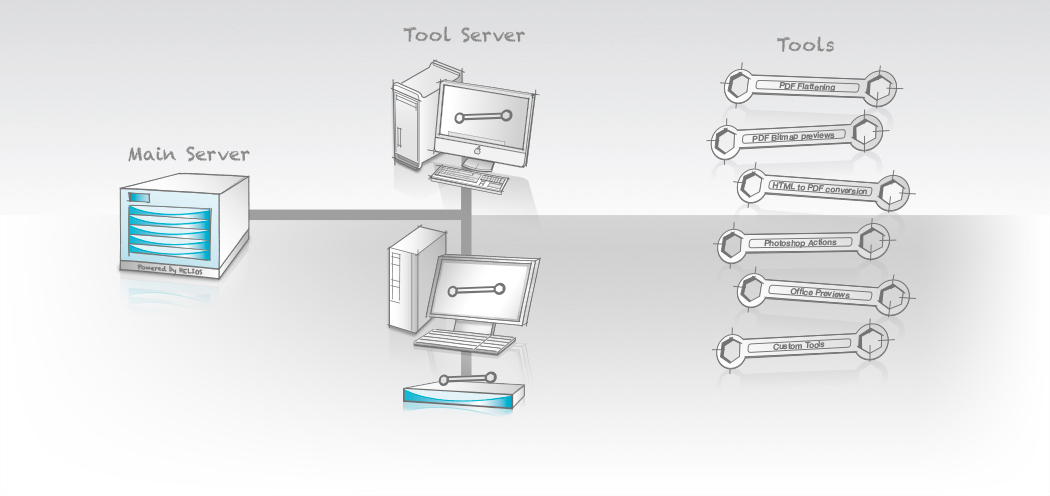
Tool Server G8 allows applications running on network clients to be automated and remotely used by the HELIOS server. Many applications and technologies are only available on a specific platform. Tool Server makes these required applications and technologies available to your HELIOS server, as a standalone process, or for integration into server workflows.
Tool Server
allows applications running on network clients to be automated and remotely used by the HELIOS server. Many applications and technologies are only available on a specific platform. Tool Server makes these required applications and technologies available to your HELIOS server, as a standalone process, or for integration into server workflows.
Most any application that can be automated (via e.g. AppleScript, shell script, VBA, Automator, etc.), on any platform (e.g. Mac, Windows, UNIX) can easily become a Tool Server tool. The system administrator simply needs to write the application automation script, and Tool Server does the rest.
The Client Server Infrastructure
is provided by Tool Server. The “toolclient” application detects all servers automatically by using Bonjour and chooses the Tool Server workstation that offers the required service with the best performance. Automatic job load balancing, file transfers, processing, auditing, and error handling makes it quite easy. Jobs can be processed completely automatically using the Tool Server “toolclient” application, or by saving files into Script Server hot folders. Hot folder automation is easily set up and monitored via HELIOS Admin.
Sample tool scripts are included for common processes such as flattening PDF documents by automating Adobe Acrobat, or sharpening images using Photoshop. In addition, examples are included for using AppleScript, Visual Basic, REALbasic, Perl, etc.
Remote Workflows
can be enabled by sharing Script Server hot folders via HELIOS WebShare.
Licensing – the tool client requires an ImageServer license. Refer to the Tool Server manual for complete licensing details. Office to PDF conversion requires Microsoft Office on Mac or Windows (not included). Automated applications must be used in accordance with their licensing terms.

- Home
- Products
File Server Products
- Powerful and fail-safe
- Perfect for mixed networks (Mac, Windows, Web clients)
Cloud Products- Secure access to files anytime and anywhere
- No “Cloud” disadvantages
- For businesses and IT service providers
- For Mac, PC, iPad, iPhone, web
Automation- Server-based workflow automation via hot folders
- Automate applications on remote computers (e.g. Photoshop actions and Acrobat PDF creation)
- Launch scripts depending on file type
- No polling
Marketing & Premedia- Server-based image processing with ICC color management
- Image conversions for Internet and print
- Automation via hot folder
- Certified soft proof with annotations
- Industries
- Solutions
- SupportSupport
Offering professional support and excellent technical resources is very important to us. HELIOS partners offer first level support. Our goal is that every problem and question must be resolved.
Updates & Tech InfoKeep the installation always up to date. Install important updates, read technical information on various topics.
Developers & Advanced StuffHELIOS solutions are often integrated into custom solutions. Here you will find advanced technical information.
MediaAll documentation is available online. We provide great overview and training videos which should help you getting started.
- News
The HELIOS News contains …
Latest Press Release: > HELIOS Universal File Server G8 released … • Latest Newsletter: > HELIOS Newsletter 02/2021 …
- Company
- English
 Enterprise Server
 Developers / SDK
 Retail / Industrial
 Newspapers / Publishers
 Photographer / Studios
 Ad Agencies / Premedia / Printers
 Video & Entertainment
 Cloud Collaboration
 HD Color
 Image Processing
 Proofing
 WebShare Connectivity
 Workflow Automation
 File Server
 Press Releases
  Videos
  Newsletters
  Events